
%20review%20%20Undisputed%20most%20powerful%20gaming%20laptop!.webp)

A look at the specifications of the ROG Strix SCAR 18 laptop
As usual, before we start our review, let's take a quick look at the specifications of the device, noting that it comes with more than one model and version that differ unequally in terms of technical specifications, but as for the specifications of the version that we have ROG Strix SCAR 18 (G834), they were as follows :Processor: Core i9 13980HX 24-core, up to 5.5GHz, 36MB cache.
RAM: 32GB of DDR5 at 4800MHz, upgradeable up to 64GB.
Storage: 2 x 2TB (1 TB each) NVMe Gen 4 (PCIe 4.0) with Raid0
Graphics card: NVIDIA GeForce RTX 4090 with 16GB of GDDR6 video memory.
Wi-Fi: Wi-Fi 6E (802.11ax).
Bluetooth: Bluetooth 5.3.
Battery: 4 cells of the type Lithium-Ion with a capacity of 90Whr supports fast charging strongly 330W with support for charging Type C 100 WATT.
Screen: 18-inch ROG Nebula at 240Hz and QHD + resolution supported by G-Sync and Dolby Vision HDR.
Camera: 720p HD.
Laptop weight: 3.10 kg.
Operating System: Windows 11 Pro.
Sound: 4-speaker Dolby Atmos sound system with Smart Amplifier Technology support.
Additional features: RGB touchpad + Aura Sync lighting support.
Ports available in the laptop:
RJ-45 2.5GbE Ethernet port.
Two USB3.2 Gen2 USB-A ports.
Port (FRL) HDMI 2.1.
USB 3.2 Type-C port supports DisplayPort 1.4 in addition to Power Delivery and G-Sync.
Thunderbolt 4 port supports G-Sync technology for external monitors and DisplayPort.
3.5mm audio port.
ROG Strix SCAR 18 laptop design

ASUS is one of the few manufacturers that knows how to offer attractive designs, with an elegant appearance and out of the ordinary. Over the past years, we have seen very impressive designs of ROG laptops, and the matter is not much different with this year’s release of the ROG Strix SCAR 18 laptop, which shines brightly. Right out of the box and turned on for the first time, the RGB lighting on the front glows through a strip that reflects the same colors as the keyboard lighting. Somehow, ASUS was able to add a similar strip at the back, just above the ventilation holes, so this is one of the creative touches that distinguishes it from the previous year’s version, along with the presence of a large ROG logo behind the screen and follows the same lighting system to finally get a stunning, eye-catching and distinctive aesthetic design. From all angles.
The creativity did not stop there, as the device comes with Armor Caps that can be attached to the back edge of the laptop. These pieces come in different shapes and designs, so you can switch between them as a way to customize the design of the laptop to reflect your personality. In other words, these pieces will enable you to customize a part of the design. ROG Strix SCAR 18 to customize it to your personal taste. And in case you find that the shapes that come with the device are not enough, you can create 3D printed pieces with a completely new design from your creativity, just head to the 3D Printed Armor Caps website to find out more about that.
More broadly and comprehensively, the design of the ROG Strix SCAR 18 has thoughtful details and many aesthetic touches. In addition to the RGB lights professionally distributed on the outer structure, we noticed that the upper part of the front surface of the keyboard has a degree of transparency that allows seeing the internal components — beautiful details that add a creative touch on the design. It is true that these things seem simple, but in general they make it a distinct design from the boring designs that we are used to in gaming laptops in particular.
In terms of manufacturing quality, it is clear that the ROG Strix SCAR 18 has a strong build, as the device is made of the finest materials that ensure the durability of the structure and its resistance to corrosion over years of use. With regard to the effect of fingerprints, we have noticed that the body of the laptop is polished with a finishing touch that prevents fingerprints or stains from being easily attracted, or at least prevents them from appearing clearly. It is also noticeable during our experience that ASUS made sure to install the laptop parts in a way that guarantees its coherence, so that there are no interstitial spaces (between the internal hardware and the surface of the chassis) to maintain the “luxurious” quality of the design. Design engineers took special care of well-distributed air vents for smooth airflow, and this is part of the ROG Intelligent Cooling system, as cooling is an important factor in an outdoor gaming rig like this.
Equipped with an 18-inch screen, the ROG Strix SCAR 18 is naturally a huge laptop, and you can easily see that even before you take it out of the box. However, ASUS has worked hard to make the size of the device as small as possible so that it is easy to carry here and there, as the device comes in a thin thickness and weighs about 3 kg. The design in general is unique, not flashy but beautiful and carries multiple creative touches, and many parts of the design are transparent, which helps in the spread of RGB lighting wonderfully, but if we had to make a defect in the design, it would be the edges of the structure made of plastic, which helps to transfer Heats quickly, only noticeable if you're doing heavy tasks that heat up components.
The screen in the ROG Strix SCAR 18 laptop

The laptop comes with a huge screen, a size unaccustomed to in gaming laptops, so that the player gets the perfect experience as if he was using a portable "desktop computer"! The screen here is an 18-inch IPS Nebula Display that has the highest standards required to give users a unique visual experience in games, as it provides a response time of 3 ms and a refresh rate of 240 Hz for super smoothness and quick response in addition to this frequency being comfortable and attractive to the eye. Because it fills the field of vision with 240 images per second, the eye receives it without much effort. The screen also comes with an acquisition rate of 89%, which is an excellent percentage given the low thickness of the side edges, and the display ratio here is 16:10 and is considered very good with a QHD + display resolution of 2560 x 1600 pixels.
It is clear that the screen in ROG Strix SCAR 18 is not intended to be designed to display a high level of graphic accuracy and detail in games only, as it is equipped with the best technologies that enhance a consistent visual experience when doing other work such as editing videos and photos or even when watching movies, where the screen comes With 100 percent cinema-grade DCI-P3 coverage, it's Pantone-certified, ensuring incredible color accuracy for a more realistic level of in-game visuals, or at least what content creators need to produce more professional-looking videos.
To complete the immersive experience, ASUS has added minor modifications to the panel to comply with TÜV Rheinland and SGS standards for eye protection, as the screen emits 70% less blue light, which I find very important for designers and gamers, some of whom tend to spend long hours using the device. In general, even for normal daily uses, the laptop has a great screen, which has almost no defects and has advantages that ensure that you get a better picture in games, but rather provides a great experience in terms of image quality and color accuracy.

But that's not all, the screen in ROG Strix SCAR 18 is accompanied by a carefully thought-out combination of technologies that take your gaming experience to another level. Initially, there is support for Dolby Vision technology, which improves the viewing experience significantly and significantly, in addition to supporting G-Sync technology to eliminate the problem of chopping in games and make the FPS frame rate more consistent with the refresh rate of the screen, and this you will see clearly in most modern AAA games, which provides a style Fun, smooth and pretty stable gameplay.
This is in addition to the MUX Switch technology, whose function is simply to separate the graphics card integrated with the CPU completely so that the screen is connected to the external graphics card directly, in this case the RTX 4090, as a result, the frames are directed to the display from the external card with the strongest performance, and this translates into improved Great performance in games. By default, this technology is disabled but can be easily activated through the Armory Crate. A device restart is required for the technology to take effect. However, we do not recommend activating it if your usage is normal, i.e. ranging from playing games to surfing the internet and watching movies, so as not to drain the battery power in light of the conduct of light activities.
ROG Strix SCAR 18 keyboard and touchpad

ROG Strix SCAR 18 comes with a customizable RGB backed keyboard, which is a full keyboard, i.e. it contains the number keys for the calculator, and there are also macro keys that can be repurposed to shorten time such as launching a game or executing a series of tasks in a row automatically, etc. Although it is not mechanical, ASUS has modified the switches to make them more responsive so that each keystroke takes a fraction of a millisecond to register, and this is very fast, which reflects a smoother and better control experience within different games compared to traditional keyboards.
According to our experience, the keyboard has a distinctive texture and gives the feeling that it is a “premium” keyboard, and it seems that it is made of high-quality materials to withstand strong pressures, knowing that the company claims to classify the keyboard so that it lasts more than 20 million clicks, and therefore it is considered ideal given the main use of this laptop which is games . It is worth noting that the keyboard also supports the N-Key Rollover feature, which makes it able to record all keystrokes regardless of the number of buttons that are pressed simultaneously, that is, no matter how many keys you press each time, the keyboard responds to each keystroke accurately. without interference or delay. In games that require pressing a large number of buttons simultaneously, you will find this feature very useful.
There is also a notable addition to this panel, which is a technology called CoolZone that ensures that your fingers will not be affected by the high temperature that results from playing games or performing heavy tasks, so that there are several holes around the WASD keys to allow the cooling fans below to suck cool air into the structure above, Thus, the keyboard keeps your fingers cool while gaming in a smart way and thus will have an impact on the gaming experience. In any case, the ROG Strix SCAR 18 keyboard is very excellent and perfectly matches the level of gaming in terms of design and a very comfortable use experience, both physically and visually.
The laptop also has a large touchpad, which is 10% larger compared to the previous version, and thus you may need to use the mouse in some cases, except for games, of course. What is new in this version for 2023 is that it also comes polished with a glass layer so that the surface is smooth and smooth.
Supported ports and connectivity technologies on the Strix SCAR 18

On both sides, we find that the ROG Strix SCAR 18 laptop provides everything you want as a gamer of modern I/O ports to connect as many external devices and accessories as possible, and it has been distributed professionally and very conveniently. On the right side, there are two USB-A ports of USB 3.2 Gen2 type, so there is no difficulty in connecting a mouse, wireless headset, or any peripherals that come with the full size of the USB. This is only for the right side, as the rest of this side has been allocated to the ventilation holes, with a part for the RGB strip.

As for the left side, it includes most of the common ports, starting with the DC Jack port to connect the main charger with a capacity of 330 watts, then followed by the RJ-45 port to connect the Ethernet cable knowing that it is equipped with 2.5G technology for a fast and stable internet speed, which is definitely necessary in games. But even if you do not prefer to use the cable to connect to the Internet, the device is supported by the latest Wi-Fi 6E technology, which is 3 times faster than the fifth generation of Wi-Fi, with 75% less latency. On the mention of wireless connectivity, the laptop also supports the improved fifth generation of Bluetooth 5.3 to ensure a stable long-term connection to various wireless devices and accessories.
The laptop also comes with an HDMI 2.1 port that allows connection to the latest TVs and monitors at speeds of up to 48Gbps, so the screen can easily be played on 4K resolution with a refresh rate of 120Hz or 8K with a frequency of 60Hz. Next in line is the Thunderbolt 4 port with a data transfer speed of up to 40 GB per second and is versatile thanks to its support for the DisplayPort standard for connecting TV screens or computer screens with a resolution of up to 8K, and therefore it is an alternative if you cannot connect them via HDMI 2.1. There is also a USB 3.2 Gen2 Type-C port that also supports DisplayPort technology in addition to Power Delivery, which means that it can be used to charge the battery with a maximum capacity of 100W. Finally the row ends with a 3.5mm headphone jack.
So, the number of ports in the laptop meets a large number of purposes and uses that meet most of the needs of users, especially when you want to connect the device to an external screen. You have more than one option to get a better gaming experience when connecting gaming screens so that you will get all its features without compromising on strong performance. .
ROG Strix SCAR 18 performance and capabilities
Simply put, ROG Strix SCAR 18 has the most powerful internal hardware any laptop on the planet can arm itself with, and it all starts with the 13980HX CPU from Intel's aristocratic Core i9 family! Which has enough technology to sweep the most demanding tasks using 24 cores divided into 16 efficiency cores and 8 performance cores along with 32 processing threads, with a maximum frequency of 5.60 GHz. Then next to it is the most powerful graphics processor ever from the green giant NVIDIA, the RTX 4090, which has the Ada Lovelace architecture to provide perfect performance for gamers and creators alike. These specs just sum up the whole story, plus it also comes with 32GB of the latest in the industry DDR5 RAM which is 50% faster than the previous generation, upgradable to 64GB as there are two slots on the motherboard for expansion whenever you need it.
If you read the capabilities and specifications of the laptop at the beginning of the article, you now expect what we are about to test, and you also expect results from outside the planet. The laptop has an Intel i9 13980HX processor with 24 cores at a speed of up to 5.5GHz and 36MB cache. You will find the capabilities of the processor in detail in the image above.

As for the graphics card in the laptop, as we mentioned, Asus has used the latest graphics card, GeForce RTX 4090 from NVIDIA, with 16GB of GDDR6 video memory.

As for storage, the laptop has an M.2 NVMe unit with a storage capacity of 2 TB, the fourth generation of the PCIe connector. Therefore, I expect a very high read and write speed, and let's directly run the test using the Crystal Disk Mark program, and the result is a reading speed of 10 gigabytes per second and a writing speed of 6 gigabytes per second, and if you follow the articles of the computer world, you now know that this storage unit is The fastest SSD unit we have tested until the time of writing this article, and through experience we have noticed this speed as soon as we open the laptop for the first time and deal with it, the performance of the SSD is quite clear.
In addition, ASUS has supported the device with the RAID 0 feature to double the speed, so that if you add an M.2 hard disk with the same storage capacity to the device, the RAID 0 can be activated to programmatically combine both of them and deal with them as if they were both a single volume, so the files are divided on them and get The total maximum read/write speed.

As for the laptop test using the well-known Cinebench R23 program, it scored 2,134 points in single-core performance and 25,270 points in multi-core performance. certainly.
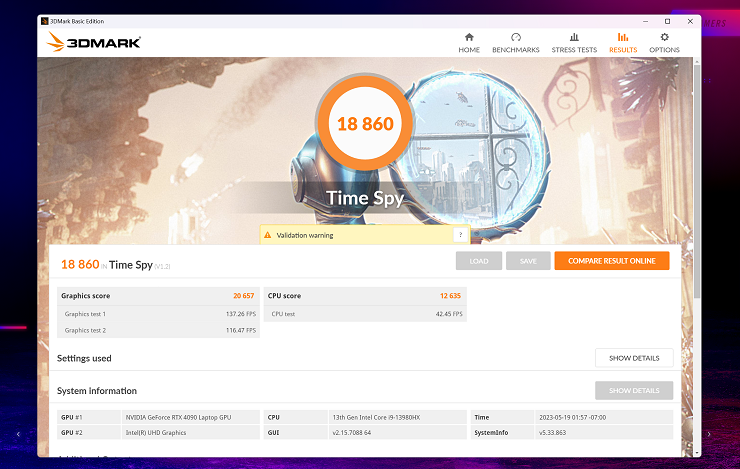
And let's also test the laptop using 3DMARK through the well-known Time Spy test, and the laptop achieved 18,860, and this result is very high.

Shadow of The Tomb Raider game at 1600p quality, the number of FPS on average reached 151 on the highest settings.

Shadow of The Tomb Raider game at 1440p quality, the number of FPS on average reached 171 on the highest settings.

Shadow of The Tomb Raider game at 1080p quality, the number of FPS on average reached 182 on the highest settings.

ROG Strix SCAR 18 comes with ROG Intelligent Cooling that unleashes the power of the most powerful internal hardware ever in a laptop, from a heat-generating Intel CPU, along with an Nvidia GPU. These components, which are designed to run games and handle complex and heavy tasks, usually need special treatment when it comes to system cooling, so the device includes a huge package of effective technologies to push the internal hardware to the limits without compromising on the stability of performance. Indeed, during our tests on the Strix SCAR 18, we noticed that the heat does not reach high levels easily, at least as we are used to with other gaming laptops.
For a start, the device contains many ventilation holes distributed nicely at the bottom and on both sides and at the bottom of the screen for smooth air flow, in addition to meeting the components’ need to absorb heat with high efficiency by providing 7 copper cooling tubes that were professionally placed so that they touch the most important main components on the motherboard and not only The processor, graphics card, and its VRAM, even the voltage regulator unit or the VRM responsible for distributing power to the components. This will keep the internal hardware from getting too hot in the long run, and consequently, you will get stable performance no matter how heavy the load!
The ROG Intelligent Cooling system has proven its effectiveness not only as a result of what was mentioned in the previous lines, there are too many cooling solutions that include it, for example, the traditional thermal paste that ASUS replaced here with Liquid Metal from Thermal Grizzly, where the Conductonaut Extreme liquid is relied upon, which helps in Reducing heat by up to 15% is indeed an excellent choice to ensure that both the CPU and GPU are kept cool. In fact, the efficiency of this liquid in transferring and dissipating heat reduces the burden on the cooling fans, and its life span is longer compared to regular thermal paste.

The cooling system here also includes 3 fans, as there is a small fan in the middle of the motherboard! It is a strange place, and we have not seen anything like it except in the Flow X16 laptop , as additional cooling is provided for the graphics card directly, which keeps the device cool while performing graphically demanding tasks or during long gaming sessions. In general, all fans are designed with curved blades to increase airflow while reducing loud noise even when playing games and performing heavy tasks. Called "Arc Flow" by ASUS, this innovative design plays an important role in the efficiency of this cooling system as each blade changes thickness at the tips down to 0.1mm, which allows for enhanced airflow, rapid heat expulsion and reduced fan noise when running at full speed.
The thing that also impressed us about the design of the dual cooling fans on the top is the Dust Filter slots, which make the fans self-clean! Meaning, the fan blades themselves, as well as the paths through which heat flows, are designed to combat dust build-up over time. The goal is not to keep the fans or the cooling area in general clean but at least to prevent dust build-up to ensure consistent cooling performance.
Finally, one of the advantages of the ROG Intelligent Cooling system is that the fans stop working automatically at low load, in a technology that ASUS calls 0dB Ambient Cooling, thanks to the presence of multiple ventilation holes that make the device dispense with fans to dissipate heat when performing light tasks such as browsing the Internet, watching movies, and any other tasks Do not let the device temperature exceed 50°C.
Thus, most of the time you spend using the laptop will not be disturbed by the noise of the fans, which lovers of quiet will appreciate! But as soon as the temperature rises above the specified threshold, the fans are automatically turned on again to keep the processor and graphics card cool, and the speed of the fans increases as needed according to the tasks that you perform.
The sound performance of the ROG Strix SCAR 18 laptop

Frankly, this laptop offers one of the best audio experiences ever, as the ROG Strix SCAR 18 comes equipped with 4 high-quality speakers that together provide a wonderful and pure sound and an awesome bass level that can be noticed when you turn up the volume, in addition to that they are distributed in very appropriate places, as there are two speakers Below the keyboard and others below the screen, so whether you're gaming or watching a movie, you'll be able to hear even the tiniest whispers and details without having to wear headphones all the time.
Moreover, all the speakers are supported by Dolby Atmos technology and also Smart Amp to enable the user to get high-quality sound and the “spatial sound” experience that we often see in phones, as the sound seems to be coming at you from different directions. This laptop includes a 3.5mm port supported by Hi-Res technology to obtain 3D sound when connecting any headphone.
The ROG Strix SCAR 18 also features a set of high-fidelity microphones in capturing your voice, which can be set in different modes through the software, in addition to that ASUS added a very impressive technology called Two-way AI Noise Cancellation, which isolates background noise with the help of artificial intelligence techniques, where it is recognized On unwanted side sounds such as the sound of the fan or keyboard pressures and isolate them from the sound of the microphone. What is unique here is that the technology will work even with external microphones that are connected to the device, and the noise isolation process depends mainly on the processor and not the screen card so that it does not affect the performance of the games.
ROG Strix SCAR 18 laptop battery
The ROG Strix SCAR 18 comes with a 4-cell lithium-ion battery with a capacity of 90Whr and provides very good performance. Through our tests, the battery holds up to about 8 headphones with normal use, such as watching movies, surfing the Internet, and so on, but as soon as it enters the line to play games, we notice a huge drop in Battery life, and this is normal and understandable and is not considered a defect in the device, as gaming laptops, without exception, suffer from the same problem, and therefore it is preferable to connect the charger to get the best performance while playing.It is worth noting that the laptop comes with a large charger with a capacity of 330 watts, but in terms of size, it is a relatively small charger, but it is somewhat heavy, but it is still good enough to take it with you to move around easily. As for the charging speed, using this original charger, the power level can be reached from zero to 50% in about half an hour, bearing in mind that the laptop also supports charging via the Type-C port with a power delivery capacity of 100 watts.
The laptop also comes with a variety of battery-saving technologies such as Advanced Optimus that work to provide a dynamic display experience to more efficiently preserve battery life. In a clearer sense, Advanced Optimus technology determines whether there is a need to take advantage of the performance power inherent in the laptop, so if it appears that you are performing heavy tasks such as running a game or making 4K or 8K video montages, this technology automatically transfers all operations to the external graphics card from Nvidia to take over Its command and thus achieve maximum performance, but if you are doing simple tasks such as watching videos, here the internal graphics card from Intel takes over the task of processing frames, which helps to preserve battery life, which is important if you use the laptop outside the house most of the time.
Armory Crate app

As we indicated, the ROG Strix SCAR 18 laptop works with the latest version of Windows 11 Pro version and comes with a number of pre-installed programs from Microsoft and ASUS, and Armory Crate is one of the most important applications that the company offers to users of its ROG series devices to support the user experience. Simply put, this application serves as your command center, as it allows you to monitor the performance of the components in detail, identify the temperature of each piece, and control the frequencies of the processors easily. And small in a simple way to make the most of it.
For example, you can control the speed of the cooling fans and set different modes for performance, bearing in mind that there are four modes, Silent, Performance, Turbo, and Manual. Each has different power settings that suit all uses. You can choose between them manually, or leave it to the application to automatically choose the appropriate mode according to the tasks. offered, as well as the ability to create a completely new mode that only works when your favorite games and programs are running. In Armory Crate you will also find the option responsible for activating and disabling the MUX Switch technology that we talked about, along with activating / disabling the touchpad and the sound that is issued when starting the device, as well as the Windows key, which is an option that you will very much appreciate if you sometimes exit the game due to pressing by mistake on the Win button, you can disable it completely if you wish.

In addition, the application allows you to control the RGB lighting professionally, as the ROG Strix SCAR 18 is distinguished by the glow of colored lights from all angles, and through the easy-to-use control panel in Armory Crate, you can switch between the lighting effects and colors that you see fit according to your taste. Aura Sync to match the colors of the glow in the laptop across accessories and other devices from the ROG that you own, in addition to the presence of a new feature in the application called Aura Wallpaper, which helps you to apply an animated wallpaper for the desktop and extract the primary colors from it to create a new color effect that allows the background colors to synchronize with the colors of the RGB in the illuminated parts to give the device a unique and attractive look.
That's not all, the app also supports full keyboard customization, specifically the hotkeys located in the top row. Instead of the default functions of controlling the volume and microphone, you can add new ones to it to save time or quickly perform certain in-game tasks. So the Armory Crate is the main console so you are sure to come back to it a lot in the early days of your laptop until you adjust everything according to your preferences and usage.

Let's not forget the MyASUS app, which is standard on all ASUS devices without exception, and is also important for controlling battery charging status, diagnosing any problem you encounter, contacting ASUS support, knowing warranty status, etc. Perhaps the most important feature offered by this application is the Link to MyASUS that integrates between the iOS/Android phone and the ROG Strix SCAR 18 laptop to get things done easily.
ROG Strix SCAR 18 laptop warranty
The ASUS Perfect Warranty covers any defects in the ROG Strix SCAR 18 for two years, meaning that if the laptop accidentally falls out of your hand and the laptop screen breaks, ASUS will service or replace the screen for you free of charge as long as the device is within the warranty coverage. But there is a note that must be taken into account, which is that Asus will take care of the maintenance of only one defect in the device every year of the warranty, for example, if there is a problem with the motherboard that prevents the operation of the laptop, the company is responsible for replacing the board without charge within the first year of the warranty, then If the same problem occurs during the same year, the cost of maintenance is borne by the user, while if another problem appears in the second year of the warranty, the company will bear it.Certainly, this type of guarantee is provided for the first time and exclusively by ASUS, as there is no similar guarantee until now in the laptop market. This device can be purchased inside Egypt from many approved stores, and it is worth noting that ASUS has become an online store to buy products and ship them directly to customers, and has also launched a new initiative under the slogan Your Voice Matters, after completing the purchase, place your evaluation of the device on the store or seller’s website, then take a screenshot This is documented, then go to the official ASUS website to create your account and fill in the required data with the photo included to win valuable gifts from the company.